Review and manage opportunities
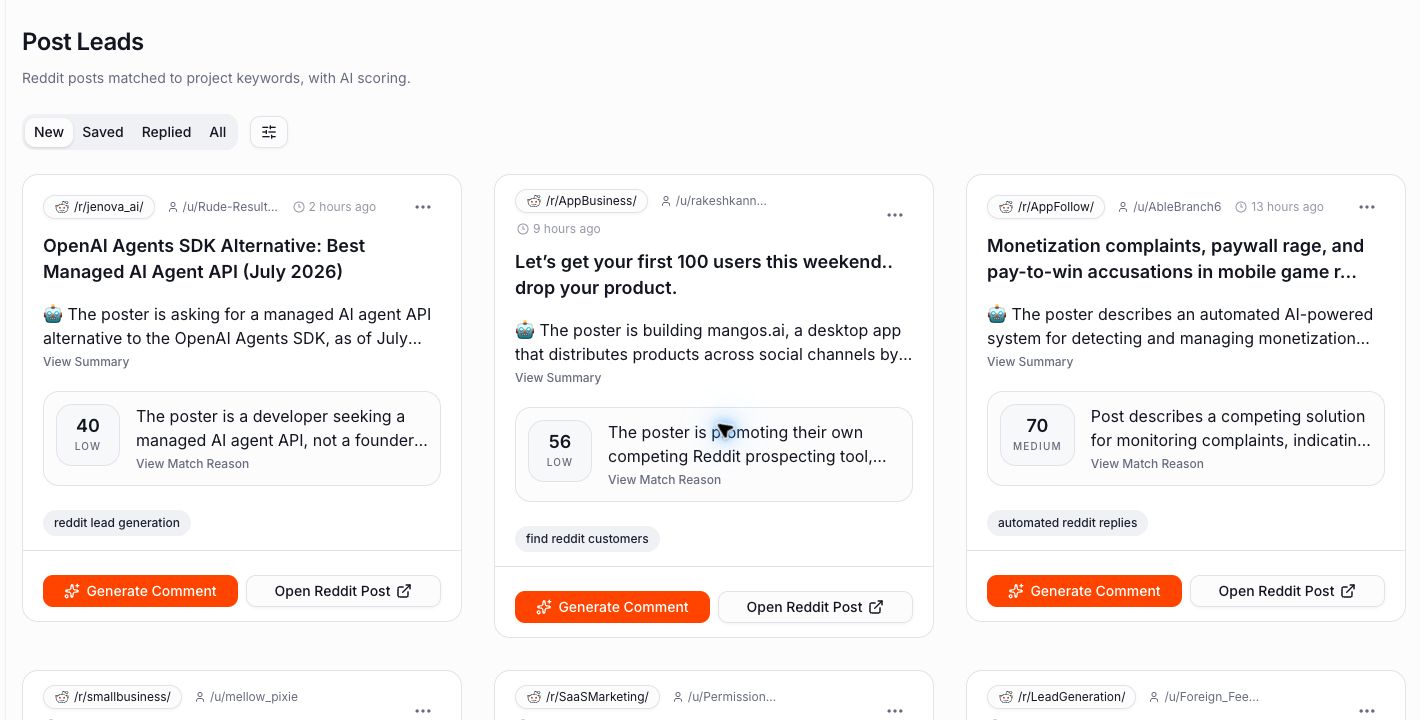
Your inbox is where IntentLoom’s matching and qualification work becomes a human decision. Review the original Reddit context, use the score and summary to prioritize, and keep only the conversations that are worth a thoughtful follow-up.
Outcome: You will know which inbox to use, how to focus the list, and how to keep your opportunity workflow organized.
Choose the right inbox
Each inbox shows a different kind of opportunity for the active project.
Posts
Use Posts for opportunities matched from Reddit submissions. This is the best daily starting point when you want to find new conversations early.
Open a post before acting. Read its title, body, subreddit, and replies to understand the actual question and whether the discussion is still active.
Comments
Use Comments for signals found inside replies to a Reddit thread. A comment can contain a strong need or comparison even when the original post is about something broader.
Always read the parent discussion as well as the matched comment. Short comments are easy to misinterpret without thread context.
Competitor conversations
Use the Competitor views to review conversations connected to competitors configured for the project. These are useful for learning about alternatives, objections, and buyer language.
They are not an invitation to reply to every comparison. Prioritize threads where you can add useful context without turning the conversation into a sales pitch.
SEO opportunities
Use SEO opportunities for Reddit threads discovered through your SEO keyword workflow. These threads may already be visible in search, so a useful contribution can remain valuable after the conversation is no longer new.
Treat search visibility as one signal, not a reason to revive an old thread with an irrelevant reply.
Start with the workflow tabs
Posts, Comments, Competitor, and SEO inboxes use the same workflow views:
- New — opportunities that still need an initial decision.
- Saved — opportunities you want to revisit or follow up on.
- Replied — opportunities you have marked after engaging on Reddit.
- All — every opportunity that has not been removed from the inbox.
Start with New. Moving an item into Saved or Replied is a simple way to keep your current work visible without treating every surfaced item as urgent.
Focus the list with filters
Use the filter control beside the workflow tabs to narrow the inbox.
- Score — focus on a relevance-score range when you need to triage a large list. A high score is a useful queueing signal, not proof that the item is a good fit.
- Keywords — on Posts and Comments, focus on conversations matched by specific project keywords.
- Competitor — in Competitor views, focus on one configured competitor.
- SEO keywords — in SEO opportunities, focus on the query that surfaced the thread.
Use filters to answer a specific question, then clear them when you return to your normal review routine. Do not rely on a narrow filter as the only measure of project quality.
Make a review decision
For each opportunity, use the same short process:
- Open the item and read the original Reddit context.
- Check the audience, problem, timing, and subreddit against your project.
- Use the AI summary and relevance score to support—not replace—your own assessment.
- Save the item if it deserves follow-up, mark it as replied after genuine engagement, or remove it when it is not a fit.
Removing a poor match keeps the inbox focused. It does not automatically block the subreddit or author; use the project block list only for sources that are consistently irrelevant.
Engage from the original thread
When an opportunity is worth pursuing, open the Reddit thread and consider the discussion before replying. A helpful response should address the question in context, be accurate, and fit the community’s norms.
Use any AI draft as a starting point, then edit it for the discussion and your own voice before posting a response that adds genuine value.
Keep a sustainable routine
You do not need to process every item immediately. A practical routine is:
- Review the New inbox regularly.
- Save a small number of promising conversations.
- Return to Saved items when you have time to research or reply well.
- Mark genuine engagements as Replied.
- Use repeated false positives to improve the project configuration.